This blog has been sadly neglected for a while. Although it was established as a requirement for one of my university courses I'm now working fulltime as library-based teacher at Amesbury School and it remains as relevant as ever. I'm fortunate to be in a position where I have the enjoyable but challenging task of developing a 21st century school library in a brand new school. Amesbury School opened less than three weeks ago and it has been a busy time setting up the physical and virtual spaces of our school library. My personal blog tracks developments from a personal perspective. However I plan to keep posting useful information I learn about school libraries here for my own interest and future reference - and perhaps yours too if you are reading this.

Sunday, 19 February 2012

Saturday, 19 November 2011
Using QR Codes in the School Library
QR
(Quick Response) codes are similar to the barcodes we are familiar with at the
supermarket. However QR codes are matrix
barcodes - two dimensional codes (as pictured below). To read the code a
device, such as a smart phone, iPod or webcam with a QR ‘reader’ installed,
scans the code which accesses information such as a website, text, phone number
or other data. The person who produces
the QR code decides what information is to be accessed, links it to a code by
using a QR code ‘generator’ and then places the code where it can be used by
the target audience. For example, a school librarian might attach a code to a
book to link the book to a website about the author, a video trailer or a set
of questions for discussion about the story.

QR Codes – Facts
·
Once
the information that is to be linked to an item has been decided on a QR code
for the information content is generated.
There are a number of free websites available to do this. Some only generate codes for a URL but others
allow you to embed text into the code.
This means that the person ‘reading’ the code doesn’t need access to the
internet but will see the text in the code directly on their scanning device.
·
A
QR code can store up to 4296 alphanumeric characters compared to a standard one
dimensional barcode which stores 12 numeric characters.
·
The
QR code that has been generated can be printed out and affixed to any object
that relates to the information in the code, for example, posters, equipment,
books and even children’s own writing or drawing.
·
The device that reads the code needs to have a
QR code reader installed. These can be
downloaded free from the internet.
QR Codes – Pros
·
Engaging
parents: The code can be used to link to
content that can actively involve parents.
For example, a code on a child’s illustration of a poem or story could
link directly to a webpage with the poem or ebook for parents to enjoy reading with
their child. Codes on library books could link to ideas for discussion
questions or activities parents could do with their children to enhance the
reading experience.
·
Adding
interest and value to library resources:
Readers can link to reviews, book trailers, videos etc related to a
book. Linking to resources produced by
the children themselves could be a strong motivator for children and parents to
read and share books together.
Codes can also link to online
resources that will help children with homework projects.
·
The Quick in ‘Quick Response’ means parents or
children can almost instantly connect to relevant resources.
·
Cost: The only financial cost is in the printing of the codes. This makes QR codes potentially a good return
on a very small investment.
QR Codes – Cons
·
Time: It takes time to find or create resources and
to generate, print and attach codes.
·
Accessibility: Not all parents will have access to a device
that reads QR codes. Parents may need
instruction on how to use QR readers.
·
Attitudes
of parents: Parents may need educating
about the value of the codes to their child’s learning or they might see them
as a bit of a ‘gimmick’. It’s important to link the codes to worthwhile
information, yet also use resources that would be enjoyable or interesting for parents
and children to explore together.
Top 100 Tools for Learning 2011
A useful list for school librarians, teachers and educators. Top 100 Tools for Learning 2011
View more presentations from Jane Hart
Friday, 23 September 2011
Ereaders Podcast
Information can be easily shared across the internet using podcasts. The podcast in this blog post is from an imaginary series called Tech Time. Its purpose is to keep librarians up to date with emerging technologies.
The technology used to create the podcast was Audacity software, with the audio file uploaded to SoundCloud.com and shared via Blogger. Audacity is open source software that is simple enough for children to use yet powerful enough to produce sophisticated audio files.
In this podcast I produced two tracks - a music track and a voice recording. I faded the music out then in again to overlay my voice introducing the Tech Time episode. I then cut the remainder of the music and generated silence on that track while I continued recording my voice on the second track. At the end I pasted and trimmed a suitable section of the remaining music to finish the podcast.
Music: 'Stroll in the Park' by Steve Glotzer
The technology used to create the podcast was Audacity software, with the audio file uploaded to SoundCloud.com and shared via Blogger. Audacity is open source software that is simple enough for children to use yet powerful enough to produce sophisticated audio files.
In this podcast I produced two tracks - a music track and a voice recording. I faded the music out then in again to overlay my voice introducing the Tech Time episode. I then cut the remainder of the music and generated silence on that track while I continued recording my voice on the second track. At the end I pasted and trimmed a suitable section of the remaining music to finish the podcast.
Music: 'Stroll in the Park' by Steve Glotzer
Sunday, 18 September 2011
Cracking the Code
Thanks to an assignment for my digital technologies paper I'm starting to understand HTML and have proudly created my very first website from scratch. It's nothing fancy - only two pages of text, two images and an embedded video - but I made it all by myself!
The topic of the website is school libraries and you can visit the website at Carolyn's Website For New Zealand School Librarians.
Sunday, 4 September 2011
QR Codes in the Library
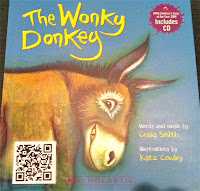
I only heard of QR codes for the first time this year and I haven't tried using them myself. My only mobile device is a basic cellphone, so apps, touch screens, 3G internet access and QR codes are all in the realm of 'when I update my phone...' at present. However I've read some blogs that have piqued my interest in QR codes, particularly in terms of adding value and interest to children's books. For example, I love the way AllanahK has linked the animation of the Wonky Donkey to the book by adding a QR code to the book cover. Also this video clip explains how QR codes on books could be used to link to such extras as recommendations, book reviews, podcasts, videos, websites etc.

Friday, 19 August 2011
DigitalNZ Search Widget - Modern Children's Literature
Some of the most beautiful books published today are children's books. Picture books with gorgeous illustrations, non-fiction books with stunning photos and diagrams, and fiction books with creative use of colour, pictures and presentation. Can you tell I'm passionate about children's literature?
If you're interested, how could you find out about modern New Zealand children's books?
Just use the handy DigitalNZ widget in the right side bar of this blog!
Alternatively use the ChildrensBooks search tool at DigitalNZ.
The keywords used to set up the search tool were children AND books. There are also time limits (after 1990) placed on the search to find only information related to modern books. Searches will return material from all sources in DigitalNZ.
I carried out an example search for 'picture books' and received 96 results, including photos of a book launch for Sharon Holt's new book. Sharon is a friend of mine so I am shamelessly promoting Sharon by using her as an example of a DigitalNZ Children's Literature search. The search terms 'authors', 'Sharon Holt' and even 'mothers' also returned information about Sharon, as well as a great variety of other material.
If you're a librarian, teacher or someone who just loves children's books this search tool should be useful for you.
If you're interested, how could you find out about modern New Zealand children's books?
Just use the handy DigitalNZ widget in the right side bar of this blog!
Alternatively use the ChildrensBooks search tool at DigitalNZ.
The keywords used to set up the search tool were children AND books. There are also time limits (after 1990) placed on the search to find only information related to modern books. Searches will return material from all sources in DigitalNZ.
I carried out an example search for 'picture books' and received 96 results, including photos of a book launch for Sharon Holt's new book. Sharon is a friend of mine so I am shamelessly promoting Sharon by using her as an example of a DigitalNZ Children's Literature search. The search terms 'authors', 'Sharon Holt' and even 'mothers' also returned information about Sharon, as well as a great variety of other material.
If you're a librarian, teacher or someone who just loves children's books this search tool should be useful for you.
 |
| Launch of Sharon Holt's book 'Your Mother Didn't Do That'. Image by Rae on DigitalNZ |
Sunday, 14 August 2011
Good Advice for Next Time
I have just found this brilliant slideshow about how to make a slideshow - not just any old slideshow but a quality presentation. It has some great suggestions on how to engage your audience and create effective slides.If only I'd known about it this time last week when I was making the e-reader presentation for my Info525 class. Oh well, I'll have some very handy tips to use next time.
STEAL THIS PRESENTATION!
View more presentations from @JESSEDEE
Friday, 12 August 2011
Introduction to E-Reader Technology
Do you grab a new technology and run with it or do you adopt a 'wait and see' position until a real need (or the boss) makes you get to grips with it? In all workplaces staff possess a variety of knowledge and attitudes to new technologies, and libraries are no exception. The slideshow below is designed to introduce staff at a public library to e-reader devices. Further explanation would be offered at the time of presentation but the main points are presented in the slideshow.
What's your opinion of the e-reader? Do you have one? Would you like one?
What's your opinion of the e-reader? Do you have one? Would you like one?
Monday, 1 August 2011
E-Reader Screen Technology
E-ink on e-paper in an e-book using an e-reader. If you take the ‘e’ out of the terms they are familiar and comfortable words. But recent technology has taken books to a new dimension, away from cellulose fibres to a kind of electronic Etch-a-Sketch. E-reader sales are increasing rapidly as developing technology improves the reading experience on these book sized mobile devices. So just how does the technology in this new reading experience work?
E-readers have unique screen technology that distinguishes them from tablets such as the iPad. E-paper uses reflected light whereas LCD screens are back lit. This means LCD screens can be used in the dark and they display colours brightly. But they are difficult to see outside, especially in bright light. One advantage of E-reader screens is that they can be read in sunlight - great for enjoying a book while relaxing in the sunshine.
Other advantages of e-reader screens compared to tablets is that are that they are easier on the eyes and they use less battery power. The screen image can be viewed at an angle and is stable once it has loaded which makes it easier to read comfortably and for long periods of time. E-readers only use power when the screen image is changing. So the batteries last longer (battery time is measured in weeks not hours) and the devices can be smaller which lowers their weight.
There are two parts to e-paper technology. The nitty gritty of it all is quite technical but here is a summary of the main features. The two parts are sometimes called frontplane and backplane. The frontplane is the ink and the backplane is the electronics used to make the text patterns on the page.
The frontplane technology that e-reader screens use is commonly called E Ink. In fact this is a company name. The screen technology of the E Ink Corporation is the most widely used and best known technology – over 50 models of e-reader use E Ink.
The 'ink' used in E-Ink is made up of millions of tiny capsules. Inside the capsules are charged particles suspended in liquid. There are positively charged white particles and negatively charged black particles. When an electrical charge is applied to the capsule the corresponding particles (black or white) move to the top of the capsule. So when the black particles are at the top we see the shape of the text. Partial charges cause a mixture of black and white particles to move to the surface so shades of grey can be made.

Magnified view of e-reader screen.
Image by Specious Reasons on Flickr
There are variations in ink technology. For example, QR-LPD technology uses particles suspended in air not liquid. An advantage is that the particles can move faster so the display changes more quickly.
Disadvantages of e-paper at present include a slow refresh rate and poor colour screen technology. The relatively slow movement of particles in the E Ink capsules means the current technology is unsuitable for animations or video. But the major challenge facing developers is to produce quality colour e-readers. This would tap into the market for children’s books, text books, newspapers and magazines. Existing e-paper technology, such as the use of filters, has so far produced rather dull colours as the filters reduce the amount of captured light.
If there is one thing that is constant in digital technology it is change and e-readers are no exception. Colour may be the next big thing in screen technology but the success of e-readers will also be dependent on factors such as ease of use, cost and content availability.
For more information visit:
Sunday, 24 July 2011
Libstech - What and Why?
This blog will relate to my university studies focusing on libraries and digital technology. Hence the name libstech.
Subscribe to:
Posts (Atom)